Sword of Vermilion
Welcome to Sword of Vermilion, play this classic retro game directly in your browser! Enjoy the nostalgic experience.
Play Sword of Vermilion Online (Sega Genesis Action RPG)
Begin a classic 16‑bit quest in Sword of Vermilion, an action role‑playing game developed and published by Sega for the Genesis / Mega Drive. Now you can play Sword of Vermilion online directly in your browser, explore towns and dungeons, fight monsters in real time and collect the rings needed to save the kingdom.
About Sword of Vermilion
Sword of Vermilion was released by Sega in 1989 for the Mega Drive in Japan and later in the early 1990s for the Sega Genesis in other regions. It is an action RPG produced under Yu Suzuki’s Sega R&D 8 team, known for mixing different gameplay perspectives: overhead towns, first‑person exploration and side‑view boss battles.
The game puts you in the role of a young prince on a quest to defeat the evil king Tsarkon, restore peace to the land and gather a set of magical rings that hold great power. Along the way you’ll visit multiple towns, explore caves and dungeons, and battle a wide variety of monsters in real‑time combat.
Story & Plot
The story begins with Erik V, king of Excalabria, who is overthrown and killed by Tsarkon, king of Cartahena. Before he dies, Erik orders his loyal warrior Blade to take his infant son, the royal heir, and escape with the Ring of Wisdom.
Blade flees to the town of Wyclif and raises the prince as his own son for eighteen years. On his deathbed, Blade finally reveals the prince’s true identity and destiny: he must collect the rings of good and evil, defeat Tsarkon and free the world from his rule. From that moment, your adventure begins.
Unique Multi‑View Gameplay
One of the most interesting things about Sword of Vermilion is its use of three different gameplay views:
-
- >
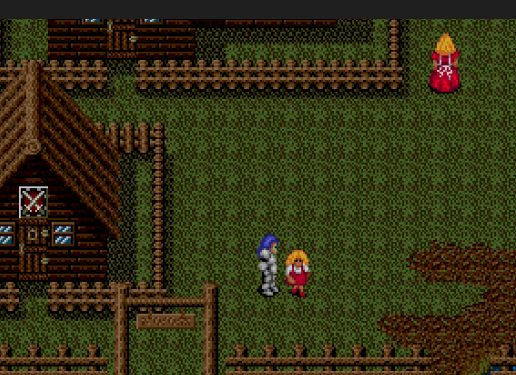
Overhead view
-
- – Used in towns and some outdoor scenes, similar to classic RPGs. You walk around, talk to NPCs, buy equipment and gather information. >
First‑person view
-
- – Used on the world map and inside dungeons. You move step by step through corridors while an on‑screen map helps you navigate. >
Side‑view battles
- – Used for boss fights and special encounters, where you move left and right on a 2D field and attack enemies in real time.
This combination makes Sword of Vermilion feel different from many other RPGs of its time, blending exploration, action combat and traditional town interactions.
How to Play Sword of Vermilion Online
Playing Sword of Vermilion on CraazyGames is easy:
- >Open the Sword of Vermilion game page and wait a few seconds for the emulator to load. >Press the on‑screen start button or the mapped keyboard key to begin. >Use your keyboard (or a controller, if supported) to move, interact, fight and cast magic.
The game runs directly in your browser using emulation, so you don’t need to download ROM files or configure a separate emulator.
Controls (Keyboard)
Control layout can vary slightly depending on the emulator, but Sword of Vermilion uses a simple Genesis‑style setup:
-
- >
Arrow Keys
-
- – Move in towns, navigate first‑person dungeons and walk during battles. >
Z / X / A / S
-
- – Confirm, swing your sword, use magic or open the command menu depending on context. >
Enter
-
- – Start / Pause. >
Shift / Backspace
- – Access additional options or switch command focus in some emulator setups.
You can usually open the emulator settings (gear icon) to remap buttons or set up a USB/Bluetooth controller for a more authentic console feel.
Towns, Quests & Progression
Your adventure takes you through multiple towns and regions, each with its own problems and dungeon nearby.
- >Enter a town, talk to villagers and the local king to learn about their troubles. >Receive a map or hint that points you to a nearby cave or dungeon. >Explore the dungeon in first‑person view, defeat a key monster or retrieve a special item. >Return to town, receive rewards and a path to the next area, often along with one of the rings you need.
Throughout the game, you gain experience points, level up, buy better weapons and armor, and learn more powerful magic to deal with tougher enemies.
Real‑Time Battles & Magic
Unlike traditional turn‑based RPGs, Sword of Vermilion uses real‑time combat in its battle scenes.
- >Random encounters happen while walking on the overworld or in dungeons. >When a battle starts, the game switches to an action arena where you move freely and swing your sword at enemies. >Later, you gain access to several types of magic, including projectiles and “attack all” spells that can hit every enemy on the field. >Boss battles use a side‑scrolling view where you dodge attacks and look for openings to strike.
Good positioning, timing and smart use of magic are important, especially against tougher enemies and dragons.
Tips for New Players
-
- >
Talk to every NPC
- in towns; they often give vital hints, maps or items needed to progress. >Save often when you are in a safe place in town; dungeons and battles can be unforgiving. >Buy better weapons and armor as soon as you can afford them; upgrades make a big difference. >Experiment with different magic types to see which spells work best in each area. >Use your map and pay attention to dungeon layouts so you don’t get lost in first‑person mazes.
Why Play Sword of Vermilion on CraazyGames?
- >Experience a unique Sega Genesis action RPG that mixes multiple viewpoints and real‑time combat. >Play instantly in your browser with no cartridge, console or emulator setup needed. >Perfect for fans of retro fantasy RPGs, dungeon exploration and old‑school Sega titles. >Free access from any modern desktop browser.
Frequently Asked Questions
Is Sword of Vermilion free to play here?
Yes. You can play Sword of Vermilion online for free in your browser on CraazyGames. There is no purchase or subscription required.
Do I need to download an emulator or ROM?
No. The game runs through an integrated emulator on the page. Just open the game, wait a few seconds for it to load, and start playing.
How long is Sword of Vermilion?
The game can take many hours to finish, especially if you explore thoroughly and level up your character. It was promoted as having a very long play time for its era.
What kind of RPG is this?
Sword of Vermilion is an action RPG that combines overhead exploration, first‑person dungeon crawling and real‑time battles, instead of using turn‑based combat.
Similar Retro Games on CraazyGames
-
- >
Sword of Sodan – Dark fantasy hack and slash adventure
-
- >
Alien 3 – Sci‑fi action with exploration and combat
-
- >
Arcade Classics – More retro action and fantasy titles
If you enjoy classic fantasy adventures, dungeon crawling and real‑time battles, Sword of Vermilion is a great Sega Genesis RPG to discover on CraazyGames.