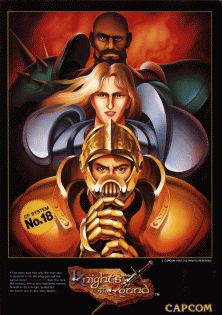
Knights of the Round
Introduction
Knights of the Round was developed and published by Capcom for its CPS-1 arcade board, released in Japan in November 1991 as part of a wave of fantasy-themed beat ’em ups the studio put out around that era, alongside titles like The King of Dragons. Loosely built around the legend of King Arthur, the game casts Merlin as the one who sends Arthur and his closest companions, Lancelot and Perceval, out to overthrow the tyrannical usurper king Garibaldi and reunite England under one banner. Up to three players fight through seven stages of sword-and-shield combat against knights, monsters, and other medieval enemies, but the game’s standout feature is a genuine action-RPG-style leveling system: characters automatically gain better weapons and armor as they defeat enemies and progress, visibly changing their appearance and combat capability as a run goes on rather than staying static from start to finish. That blend of detailed medieval sprite art, straightforward hack-and-slash combat, and RPG-lite character growth gave Knights of the Round a distinct identity among Capcom’s early-90s brawlers, and it remains a well-regarded cult favorite from the CPS-1 library.
Knights of the Round
How to Play Knights of the Round Online
Press Start Game above, insert a coin with Select and press Start. Up to three players can fight together, each choosing Arthur, Lancelot or Perceval. The game uses a joystick and two buttons, attack and jump, so it is easy to play on a keyboard: by default the arrow keys move and Z and X are the two buttons. You can change them in Control Settings in the emulator menu.
Controls
| Input | Action |
|---|---|
| Joystick | Walk in eight directions |
| Attack | Sword or axe combo |
| Jump | Jump; press attack in the air for a jumping strike |
| Attack + Jump | Powerful special attack that costs a little health |
| Walk next to a horse and jump | Mount the horse |
The Three Knights
- Arthur is the balanced hero with a sword.
- Lancelot is quick, with fast sword slashes.
- Perceval is slow but very strong, swinging a heavy axe.
Tips
- Level up by scoring. As your score rises, your knight levels up, gaining new armour, a stronger weapon and a longer life bar. Collecting treasure is the fastest way to grow.
- Ride horses when you find them; mounted knights hit hard and knock enemies over.
- Save the special attack for when you are surrounded, since it costs health.
- Break barrels and chests for food that restores health.
History
Capcom released Knights of the Round in arcades in 1991, in the same era as Final Fight and The King of Dragons. It retells the Arthurian legend as a side-scrolling beat ’em up across seven stages, ending with the battle against the tyrant Garibaldi. If you like it, try The King of Dragons, Captain Commando or Final Fight.